Shift Cable Adjustment
- Remove the center console cover (see
CENTER CONSOLE REMOVAL/INSTALLATION
).
- Shift the transmission into R.
- Remove the nut securing the shift cable end.
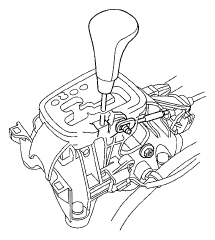 Courtesy of AMERICAN HONDA MOTOR CO., INC.
- Press the holder lock release (A), and pull out the socket holder (B) on the shift cable (C) of the shift lever bracket base (D). Do not remove the shift cable by pulling the shift cable guide (E).
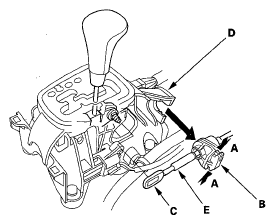 Courtesy of AMERICAN HONDA MOTOR CO., INC.
- Push the shift cable until it stops, then release it. Pull the shift cable back one step so that the shift position is in R. Do not hold the shift cable guide (A) to adjust the shift cable (B).
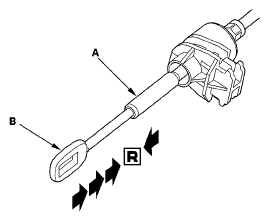 Courtesy of AMERICAN HONDA MOTOR CO., INC.
- Turn the ignition switch to ON (II), and check that R indicator comes on.
- Turn the ignition switch to LOCK (0).
- Place the shift lever in R, then insert a 6.0 mm (0.24 in.) pin (A) through the positioning hole (B) on the shift lever bracket base and into the positioning hole (C) on the shift lever. The shift lever is secured in R.
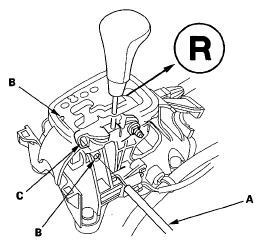 Courtesy of AMERICAN HONDA MOTOR CO., INC.
- Align the socket holder (A) on the shift cable (B) with the slot in the bracket base (C), then slide the holder into the bracket base. Install the shift cable end (D) over the mounting stud (E) by aligning its square hole (F) with the square fitting (G) at the bottom of the stud. Push the holder until it snaps securely in place. Do not install the shift cable by holding the shift cable guide (H).
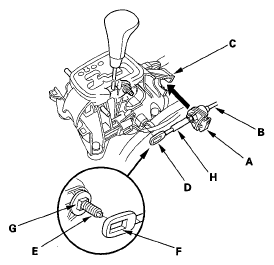 Courtesy of AMERICAN HONDA MOTOR CO., INC.
- Check that the shift cable end (A) is properly installed on the mounting stud (B).
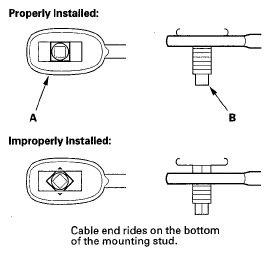 Courtesy of AMERICAN HONDA MOTOR CO., INC.
- If improperly installed, remove the shift cable from the bracket base, and reinstall the shift cable. Do not install the shift cable end on the mounting stud while the shift cable is on the bracket base.
- Install and tighten the nut.
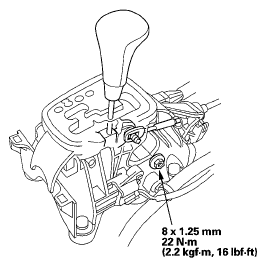 Courtesy of AMERICAN HONDA MOTOR CO., INC.
- Remove the 6.0 mm (0.24 in.) pin that was installed to hold the shift lever.
- Move the shift lever to the each position, and check that the A/T gear position indicator follows the transmission range switch.
- Push the shift lock release, and check that the shift lever releases.
- Reinstall the center console cover (see
CENTER CONSOLE REMOVAL/INSTALLATION
).