Dashlights Brightness Controller Test/Replacement
- Remove the instrument fascia (see
DRIVER'S INNER DASHBOARD TRIM REMOVAL/INSTALLATION
).
- Disconnect the 6P connector (A) from the dashlights brightness controller (B).
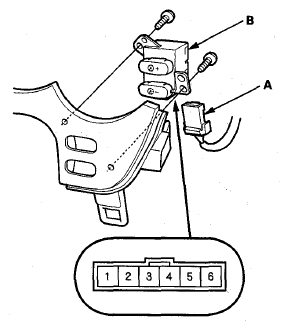 Courtesy of AMERICAN HONDA MOTOR CO., INC.
- Remove the two screws and the dashlights brightness controller.
- Check for continuity between terminals No. 5 and No. 6.
- There should be continuity when the ILLUMI (-) button is pressed.
- There should be no continuity when the ILLUMI (-) button is released.
- Check for continuity between terminals No. 4 and No. 6.
- There should be continuity when the ILLUMI (+) button is pressed.
- There should be no continuity when the ILLUMI (+) button is released.
- If the continuity is as not specified, replace the controller.
- Check the LED by connecting battery power to terminal No. 1 and ground to terminal No. 2. The LED should come on.
- If the LED does not work; replace the dashlights brightness controller assembly.