Power Window Switch
- Remove window switch from door trim panel. See POWER WINDOW SWITCH
under REMOVAL & INSTALLATION. Using an ohmmeter, check switch continuity. See appropriate WINDOW SWITCH CONTINUITY table. See Fig 1
or Fig 2
. Replace power window switch as necessary.
- Vehicles equipped with Auto Down feature have electronic components in driver's side switch to actuate Auto Down. To test, check switch continuity, reconnect switch, turn ignition on and test feature. If Auto Down does not work, replace switch.
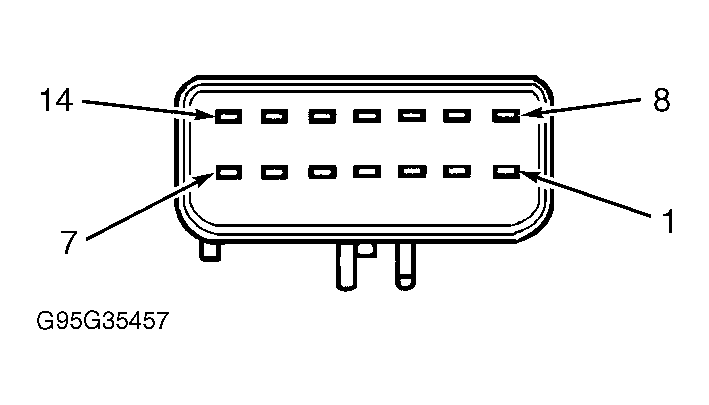 Courtesy of CHRYSLER CORP.
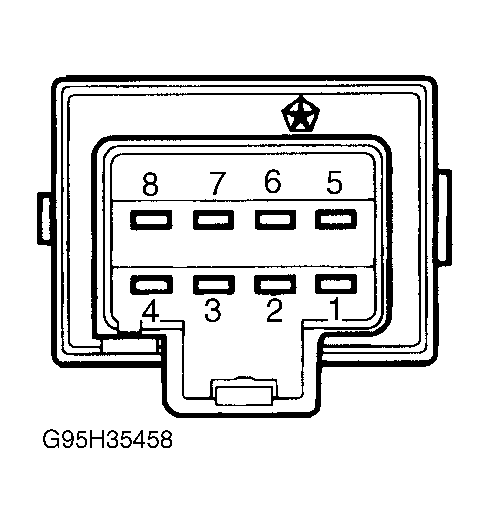 Courtesy of CHRYSLER CORP.
 DRIVER'S WINDOW SWITCH CONTINUITY
| Switch Position |
Continuity Between Terminals No. |
| Off |
1 & 13; 2 & 13; 3 & 13; 4 & 13; 5 & 13; 6 & 13, 7 & 13; 8 & 13 |
| Up |
| Driver's Side |
8 & 11 |
| Passenger's Side |
4 & 9 |
| Down |
| Driver's Side |
6 & 11 |
| Passenger's Side |
2 & 9 |
| Auto Down |
| Driver's Side |
6 & 11 |
| Vent Open |
| Driver's Side |
7 & 11 |
| Passenger's Side |
1 & 9 |
| Vent Close |
| Driver's Side |
3 & 9 |
| Passenger's Side |
5 & 11 |
PASSENGER'S WINDOW SWITCH CONTINUITY
| Switch Position |
Continuity Between Terminals No. |
| Off |
2 & 5; 3 & 8 |
| Up |
4 & 8 |
| Down |
4 & 5 |