Fuel Computer: Self-Test
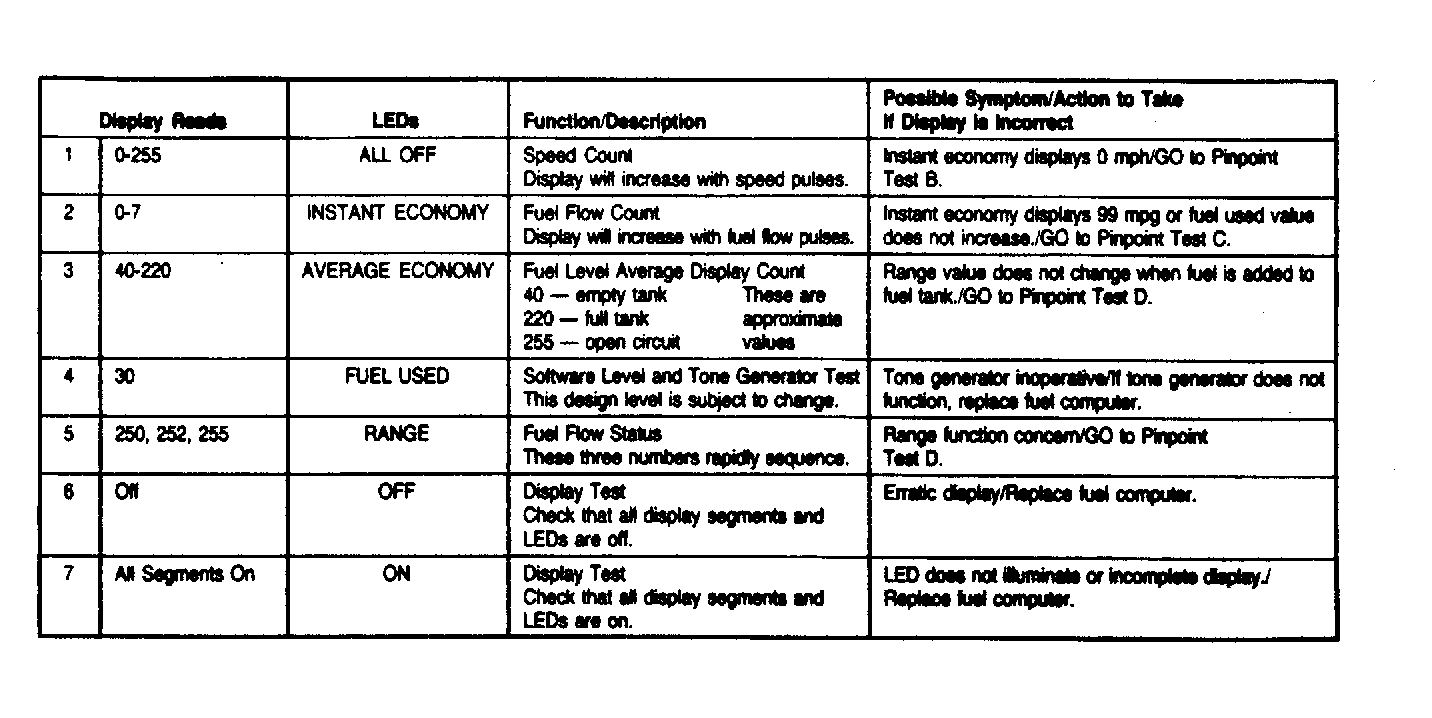
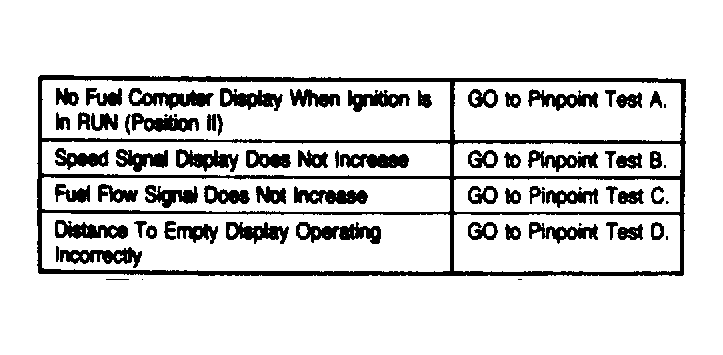
- Self-test is comprised of 7 sequences which are selected by the function button. The results are displayed by LED's and module display. If display reading does not correspond to table, go to appropriate diagnosis by symptom test. See Fig 1
. See the DIAGNOSIS BY SYMPTOM TEST table in the figure. See Fig 2
. To avoid damage to connectors, manufacturer recommends use of Diagnostic Test Leads (T88M-50-TL) to test system.
- If self-test mode cannot be entered, fuel computer should be replaced. To enter test mode, press and hold down function button a minimum of 5 seconds. Mode LED's will disappear and display will show first test results. Depress function button to sequence through tests No. 1-7. Results should correspond to table. See Fig 1
. Depress button "C" to exit self-test mode.
 Courtesy of FORD MOTOR CO.
 Courtesy of FORD MOTOR CO.