Maintenance Reminder Light
- Turn ignition on. Maintenance reminder light should come on for 2 seconds. If light flashes or stays on, vehicle maintenance should be performed. To reset maintenance reminder unit, turn ignition on. Remove lower left dash cover. Press and hold reset button for more than 3 seconds. Install dash cover. If maintenance reminder light does not work as described, go to next step.
- Turn ignition off. Remove lower left dash cover. Disconnect wiring from maintenance reminder unit. Ensure Black wire has continuity to ground. See Fig 1
. If continuity does not exist, repair open in wire.
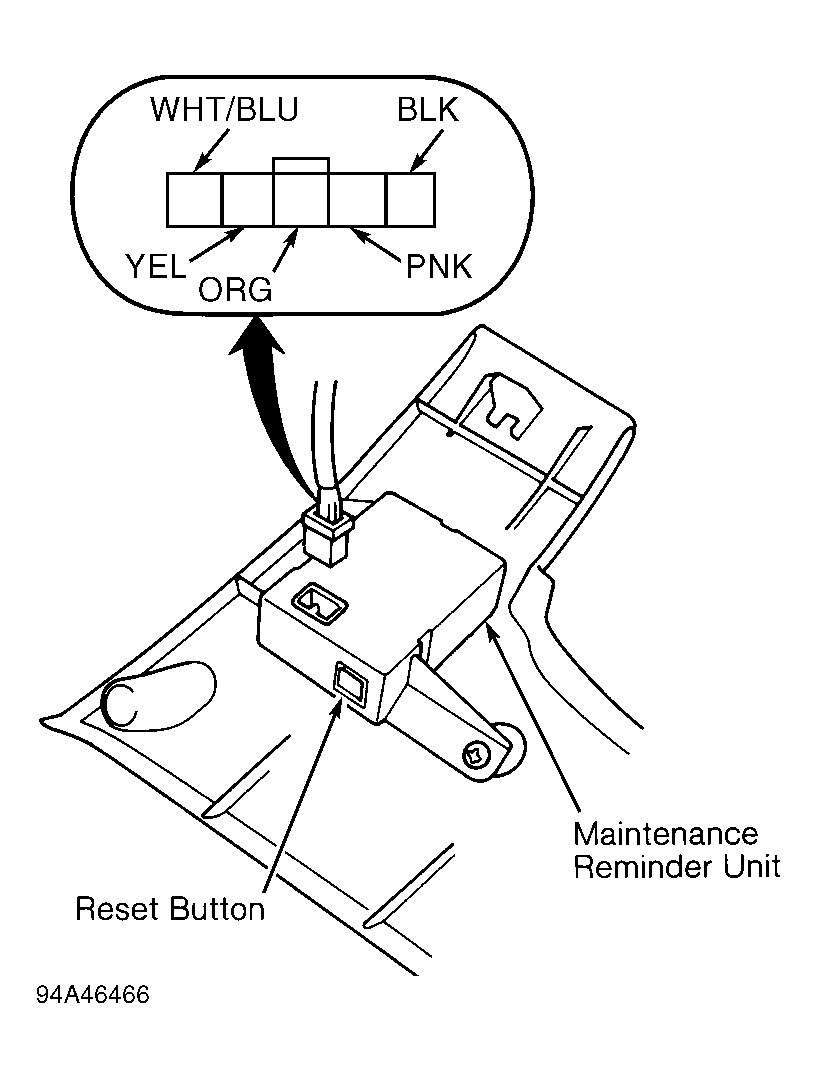 Courtesy of AMERICAN HONDA MOTOR CO., INC.
- Check White/Blue wire for battery voltage. If battery voltage is present, go to next step. If battery voltage is not present, check fuse No. 32 or White/Blue wire for open. Repair as necessary.
- Turn ignition on. Check Yellow wire for battery voltage. See Fig 1
. If battery voltage is present, go to next step. If battery voltage is not present, check fuse No. 15 or Yellow wire for open. Repair as necessary.
- Ground Pink wire. Maintenance reminder light on dash should go on. If light goes on, go to next step. If light does not go on, check fuse No. 10, bulb condition and Pink wire for open. Repair as necessary.
- Raise and support one front wheel. Check for pulsing voltage at Orange wire while rotating front wheel. If voltage pulses, circuits are okay. If maintenance reminder light still does not work correctly, replace maintenance reminder unit. If voltage does not pulse, check vehicle speed sensor or Orange wire for open. Repair as necessary.